- MCQ questions
- Coding tests
- React tasks
- Built-in proctoring
- AI résumé match score

One Place for Screening
Post jobs, review applicants and send skills assessments from one dashboard, instead of juggling separate tools.

Hire on Evidence
Job-like coding and React tasks show how candidates actually work, so decisions rest on more than a résumé.
Proctoring Built In
Full-screen tests, camera pictures and a record of when a candidate leaves the test window help you trust the results.

Create Skills Assessments in Minutes
Test Real Skills, Not Just Résumés
Combine multiple-choice, coding and React questions in one assessment to see how a candidate actually works, not just what their résumé says.
Use the Question Bank or Write Your Own
Start from the question bank included in your plan, or write your own questions for the role you are hiring for.
Give candidates an assessment that feels like the job
Add a personal welcome
Show candidates a welcome video from your team at the start of the assessment, so they know who they are applying to.
Craft an exceptional experience for candidates
Give candidates the chance to showcase their abilities through practical challenges instead of relying on outdated assessments and knowledge tests that may not accurately represent the demands of the role.
AI and automation
AI that does the first read
SkillMatch uses AI where it saves you time today. Scores help you decide who to look at first; your team makes every hiring decision.
Résumé match score
Each application that comes with a résumé is scored against your job description, so you can sort applicants by fit before you open a single CV.
Résumé and job reading
Résumés and job descriptions are read automatically to pick out skills and experience, which is what the match score is built on.
Automatic grading
Coding answers are run against test cases and multiple-choice answers are marked as soon as a candidate submits, so results are ready without manual marking.
Integrity
Assessments you can trust
Proctoring is built into every assessment. Turn on what you need, then review the signals in each candidate's report. No tool makes cheating impossible, but SkillMatch makes it visible.
Camera pictures
Turn on camera proctoring and the candidate's camera takes pictures during the test, ready for you to review in their report.
Full-screen tests
Assessments run in full-screen mode. Leaving full screen or switching to another tab or window interrupts the test.
Window and screen checks
See how often the mouse left the test window and whether more than one screen was in use.
Network and device details
IP address changes, the browser and operating system, and whether the test was taken on a phone.
3
Question types: MCQ, coding and React
AI
Résumé match score on applications
6
Proctoring signals per candidate
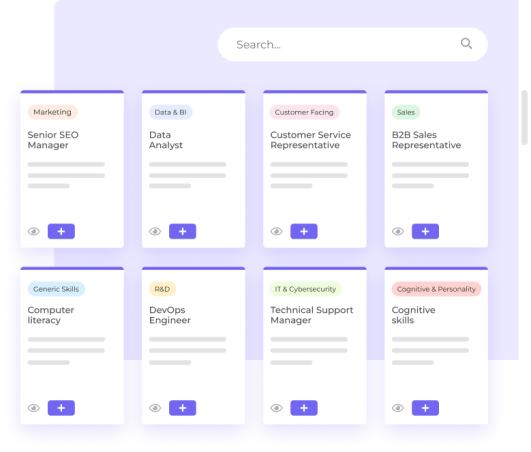
Ideas for your next assessment
Examples of roles you can assess with SkillMatch. Build yours from your plan's question bank or your own questions.
Skills-based hiring FAQ
What types of roles and candidates can SkillMatch be used for?
SkillMatch is built for hiring software and technical roles, from junior to senior: developers, front-end engineers and other roles where you want to see real skills. Multiple-choice questions also work for non-technical knowledge checks.
What coding languages, skills and question types does SkillMatch support?
Coding questions are answered in languages such as JavaScript, TypeScript and Python, and are graded by running the candidate's code against test cases. React questions test front-end work in a live editor. Multiple-choice questions can cover any topic. You can use the question bank included in your plan or write your own.
Can we create our own custom challenges and questions?
Yes. You can write your own multiple-choice, coding and React questions, group them into tests, and combine tests into an assessment. How many you can create depends on your plan.
What support is available? Can I book a demo?
Email [email protected] for help with your account, or [email protected] for anything else, and our team will get back to you. You can also book a 30-minute demo from the Book a Demo button.
What subscription plans are available, and what are the limits?
Plans differ in how many assessments, tests, questions, job posts and candidate invites you can use, and in access to the question banks. The pricing page lists every plan and its limits. For prices, contact us or book a demo and we will share them.
How is SkillMatch different from other assessment tools?
SkillMatch keeps job posting, applicant review, AI résumé match scores and skills assessments in one place, instead of separate tools. Coding and React work is graded automatically, proctoring is built in, and plans are priced for small teams.
How does SkillMatch help prevent cheating?
Assessments run in full-screen mode, and leaving full screen or switching to another tab or window interrupts the test. Companies can also turn on camera pictures taken during the test, and see how often the mouse left the test window, whether more than one screen was used, IP address changes, and the candidate's browser and device. No tool makes cheating impossible, but these signals make it visible.
How will SkillMatch help us save time?
Applicants who apply with a résumé get an AI match score against your job, so you can see who to look at first. Assessments are graded automatically, and you can compare candidates' results in one place, so your interview time goes to the strongest people.
Explore Your Hiring Journey with Confidence: Start Assessing Now
Get Started for free | No credit card needed
Copyright © 2023–2026 SkillMatch (Private) Limited. All rights reserved.